About the Tool
Web application tests often end up in one of three states:
- they are either useless
- or too expensive to maintain
- or there simply isn't time for them
Popular testing approaches also come with their own drawbacks:
- Unit tests are easy to write, but they don’t capture real UI behavior and often become overly coupled to internal implementation details
- E2E tests provide confidence, but are slow, fragile, and frequently fall outside the control of frontend teams
- Component tests appear as a compromise, but in practice often inherit the weaknesses of both approaches
As a result, tests live separately from development, and development happens separately from tests.
What Is Storyshots
storyshots makes tests the primary tool of development.
It’s a framework and set of practices for test-assisted web application development, where the test doesn’t get written after, but emerges naturally during development.
Is this TDD?
TDD focuses on writing the test before the implementation, whereas storyshots operates during development.
However, storyshots supports various testing practices, including TDD.UI Interaction
The typical development workflow looks like this:
- We start the dev server
- Open the app in the browser
- Navigate to the desired page
- Manually put the UI into the required state (fill forms, click lists, perform a sequence of actions)
- Only then do we start writing code.
Any change to the source code triggers a restart — and all manually built state is lost.
The developer must repeatedly re-create the same scenario.
What about HMR?
There are mechanisms for partial state preservation (e.g., HMR), but they don’t guarantee correctness in complex cases or hybrid environments (CSR + SSR, isomorphic code, side effects).
Moreover, storyshots doesn’t replace HMR — it complements it.
storyshots turns this manual effort into a story — a reproducible, deterministic UI scenario that can be:
- reproduced
- paused
- modified
- and used as a development environment
The key element here is the UI mode.
A Test You Can Develop In
UI Mode is one of the core features of storyshots:
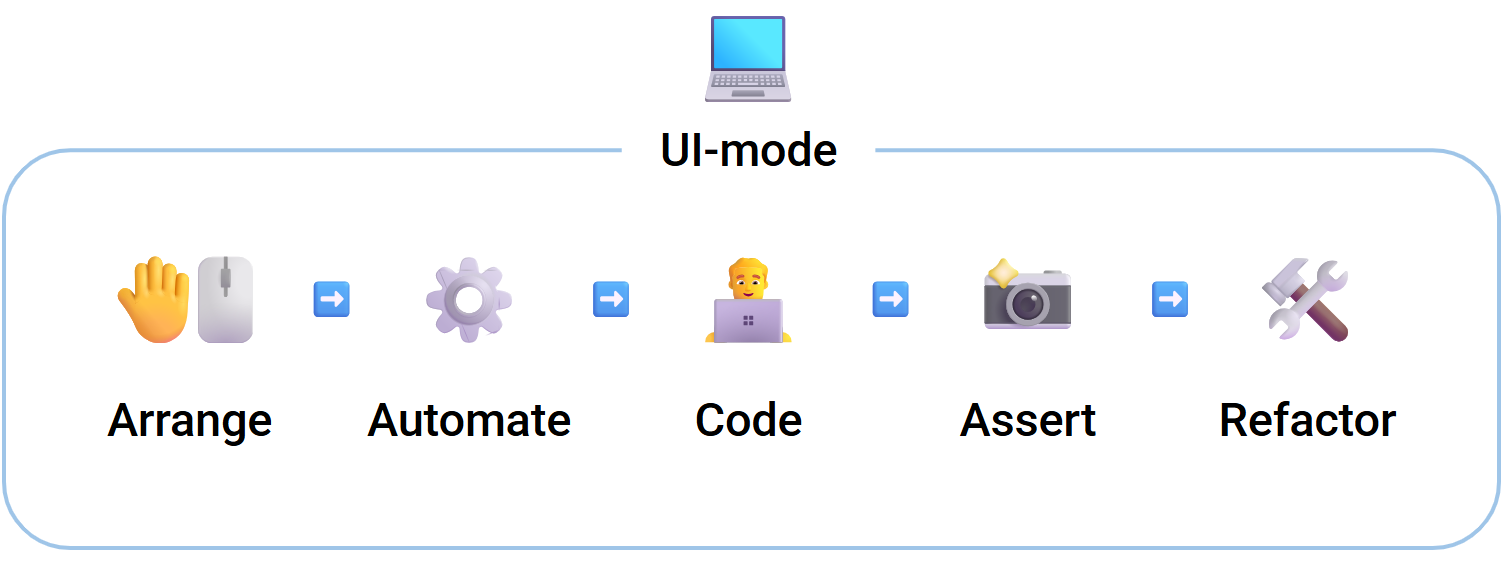
In UI mode, the developer:
- 🤚🖱️ interacts with the app as usual
- ⚙️ automates actions, turning them into a story
- 👨💻 develops and debugs code just like in a regular browser
- 📸 captures the desired behavior
- 🛠️ refactors the implementation without fear of breaking anything
The test and the behavior are created simultaneously and are inseparable.
Tests are no longer postponed to "later" — they naturally emerge alongside new features.
UI mode also enables:
- 👀 observing test execution in real time
- ⏸️ pausing the scenario and resuming development from the current state
- 📱 emulating different devices
- ⚡ rapidly reproducing complex environments and states
UI mode is an enhanced browser for web developers, not just a test runner.
Behavior Verification, Not Implementation
storyshots verifies the application using the golden master technique.
Verification happens in automatic mode — the developer only needs to specify what and when to capture.
Special patterns and tools in storyshots were designed to significantly improve maintainability of baseline testing specifically in the context of UI.
storyshots verifies behavior, not implementation — what the user actually sees and receives, as well as any interactions with external systems you consider important.
Stability at the Architectural Level
storyshots ensures test independence from implementation details at the architectural level, which in turn:
- Further strengthens regression protection.
- Allows developers to perform even the most extensive refactoring of the codebase.
- Enables integration into long-lived projects with large codebases.
Why Storyshots
- 💻 UI Mode — a unified environment for development and testing.
- 🛡️ Full-featured tests — easy to write, reliably protect against regressions.
- 🚀 Minimal test code — simpler to maintain and evolve.
- 📝 Living documentation — generated automatically.
- 🔗 Easy integration — suitable even for mature, large-scale projects.
- 💯 Everything included — from ready-made solutions to proven patterns and recommendations.
storyshots does not replace unit or e2e tests — it fills the gap between them, where real UI behavior, fast feedback, and freedom to change are essential.
Who It Suits
- Teams choosing a testing strategy from the start
- Teams with active UI development and frequent refactoring
- Projects with long-lived frontend code
- Applications with hybrid runtime (e.g., Next.js)
Getting Started
- ⚡ Quick Start — Installation, UI Mode, and example projects
- 📘 Deep Dive — Specification, API, and Patterns