Architecture
storyshots is an implementation of the specification. The library extends the model with the following:
- Browser as a deterministic system — tests run in the browser, in the target environment of web applications.
- Test-assisted programming — tests are used as a development environment in an advanced UI mode.
- Closed architecture —
storyshotsis opaque to the implementation details of applications, simplifying integration. - Extensibility — the
storyshotscore is easily extended with additional tools and application adapters.
Let’s examine the architecture of the main packages in more detail:
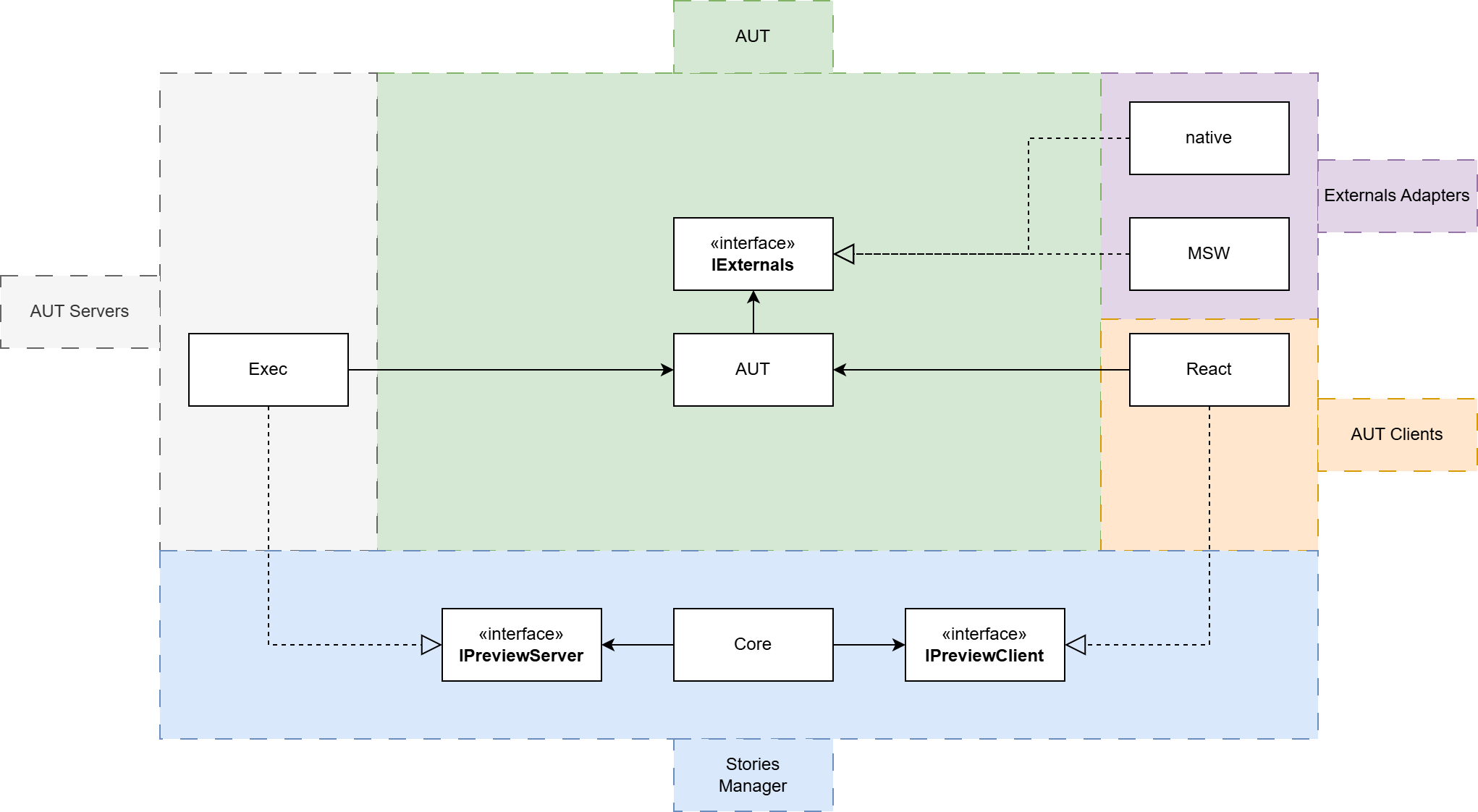
The diagram shows all major layers, on which only some of the existing modules are located. The full list is provided in the corresponding section.
AUT
AUT is the part of the application under test. The larger it is, the greater the test coverage and the better it protects against regressions.
IExternals
The interface for interacting with the external environment, methods for reading and writing data.
On most projects, this interface exists implicitly, meaning it is not declared at all.
Stories Manager
The core layer of storyshots, consisting of a single package @storyshots/core. Its responsibilities include:
- Base primitives — defines the core entities of the project: stories, transformations, configurations.
- UI mode — implements the UI mode for managing stories.
- CI mode — implements the background mode for running stories.
- Testing — implements everything related to testing: handling baselines, updating baselines, error processing, determining passed scenarios.
It is fully independent of the stack used in the project thanks to the IPreviewClient and AppServerFactory interfaces.
IPreviewClient
The client-side part of the AUT, integrating the stories manager with the application under test.
Responsibilities:
- Describing the main test scenarios.
- Displaying the selected story with specified parameters on the screen.
- Integrating the AUT state and test lifecycle: setting up the state and performing a full reset.
All the responsibilities of IPreviewClient are implemented with consideration for the actual stack of the application under test:
- Simplifies
storyshotsintegration. - Increases regression protection.
- Simplifies reuse of system components.
AppServerFactory
AppServerFactory is a factory that runs the AUT server.
storyshots runs AUT in two modes:
exploration- runs an app just to retrieve a list of all available stories from a client.emulation- runs an app providing a story to be emulated for testing purposes.
at
The host of the web application, typically the root address of the dev server:
const server = {
  // The address where the dev server serving IPreviewClient is deployed
  at: 'http://localhost:3000',
  /* ... */
}
cleanup
A function called when the server is shut down. Used to free up allocated resources.
const server = app.listen();

const config = {
  // Close the server when exiting storyshots mode
  cleanup: () => server.close()
  /* ... */
}
AUT Clients
A layer containing components that adapt the AUT to the IPreviewClient interface.
The package @storyshots/react adapts React applications for the storyshots manager.
To use storyshots in, for example, a Vue application, all that’s needed is to implement the IPreviewClient interface.
AUT Servers
A layer containing adapters for build tools and servers of the AUT, implemented on the AppServerFactory interface.
@storyshots/exec-preview — an app server using the original build scripts of the AUT.
@storyshots/next is an example of a module that implements both IPreviewClient and AppServerFactory.
External Environment Adapters
Implement mechanisms for replacing methods for reading and writing data in the external environment using various approaches:
native— a symbolic representation of a component. Describes one of the approaches for self-replacement of dependencies.@storyshots/msw-externals— implements a non-invasive method of replacement using themswlibrary.