Work Order
Golden master testing contains certain nuances of usage. storyshots is no exception, and the following recommendations are provided for working in various conditions.
Work Scenarios
To improve testing efficiency, it is recommended to follow these practices:
When Developing Without API
If a ready API is not available at the start of work, it is recommended to:
- Agree on contracts with the backend developer
- Implement stubs in
externalsaccording to the agreed contracts - Describe
storyshotsstories according to requirements - Generate a baseline and save it in the baseline repository
- Perform integration once the API is ready
Baseline lists can be used as a documentation source, for example, when searching for already implemented components in the system.
If the contract is changed after backend implementation, stubs must be adjusted and the steps above repeated.
When Developing With API
If a ready API is available at the start of work, it is recommended to:
- Form a contract based on actual API methods
- Implement stubs in
externalsbased on existing contracts - Describe
storyshotsstories according to requirements - Generate a baseline and save it in the baseline repository
- Perform integration with the actual API method
Steps 1 and 2 can be skipped if stubs were already implemented earlier.
It is recommended to populate stubs with data from mockups, even if real APIs return non-empty information.
When Handling Defects
Defects are an inevitable part of any project. However, given that storyshots tests are in place, special attention should be paid to the root cause of the defect’s appearance. Why did the tests pass, yet the defect still exists?
The recommended sequence of actions is as follows:
- Set up stubs. HAR snapshots of network queries can be used.
- Set up actions. Steps to reproduce can be used.
- Write a story where the defect is reproduced.
- Fix the defect.
- Ensure the defect no longer occurs in the story.
- Commit the baseline.
- Verify in a real environment.
Thus, this defect will not reoccur under the given preconditions.
Following this strategy makes application development resemble an iterative process, where each new version is more stable than the previous one.
It should be understood that storyshots does not test the application as a whole. On the contrary, the library strikes a balance between test maintainability and the protection they provide. Therefore, it is perfectly normal for some defects to be detected without being caught by tests.
When Refactoring
storyshots greatly supports refactoring by providing protection against accidental regressions. The recommended workflow is as follows:
- Define the scope of work
- If the refactoring is large, break it into sub-steps
- After each step, run tests in UI mode
- After completing a step and running tests, commit the changes.
- Repeat steps 3 and 4 until all work is complete
Baseline Separation
storyshots verifies application behavior by comparing baselines of its behavior. Most often, these are screenshots.
Numerous advantages of visual testing are offset by significant drawbacks, one of which is high sensitivity to the execution environment. Two main categories can be identified:
- Queries — substituted programmatically
- Execution environment — manually controlled
The operating system and even specific hardware affect the final screenshot result.
In team development, different machines with different operating systems are used. For such cases, the following workflow is proposed:
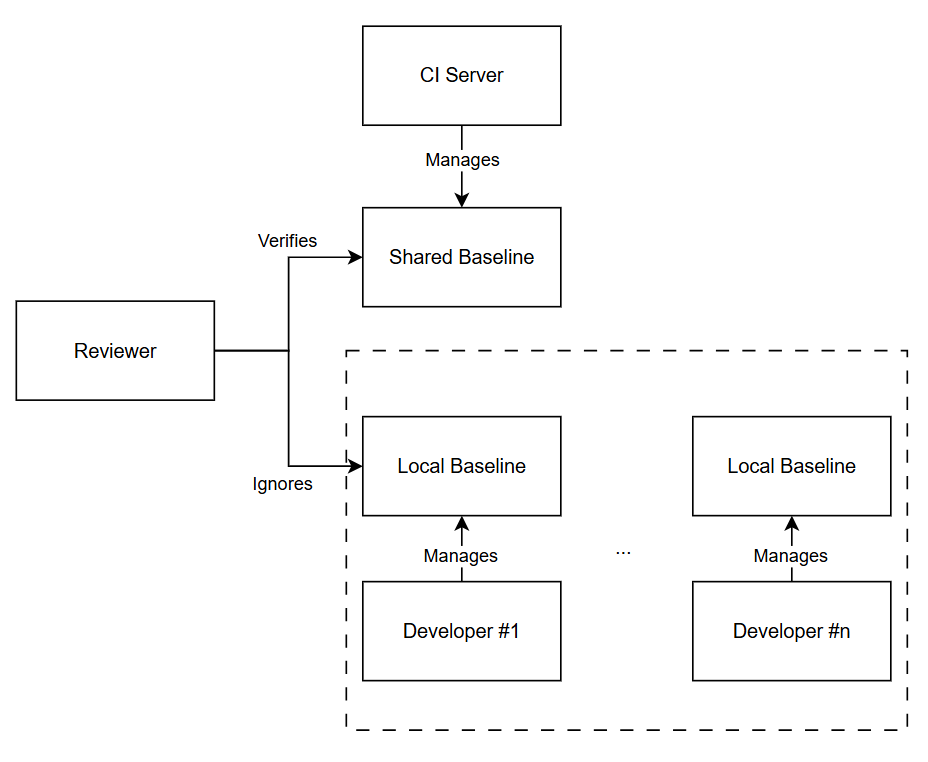
- Local Baseline — a unique baseline for each developer. Excluded from VCS.
- Global Baseline — a shared baseline used as a single source of truth for correct behavior. Generated on a single server.
Creating a global baseline is done in background mode. CI/CD template implementations can be found here.
In this setup, the recommended workflow during development is:
- Create a branch for a specific task
- Generate a local behavior baseline
- Develop stories and create new screenshots in the local baseline
- Upon completion, create a merge request (MR)
- Within the request, run a script that generates a global baseline from this branch
- Automatically commit the global baseline into the branch
- Reviewer examines the MR together with screenshots from the global baseline
Logs are not environment-sensitive, so they do not need to be separated.
If a regression occurs in the MR, do not simply restart CI/CD to regenerate the global baseline. Instead, revert the previous baseline generation commit to avoid cluttering the history and confusing the MR reviewer.